This is default featured slide 1 title

Go to Blogger edit html and find these sentences.Now replace these sentences with your own descriptions.

This is default featured slide 2 title

Go to Blogger edit html and find these sentences.Now replace these sentences with your own descriptions.

This is default featured slide 3 title

Go to Blogger edit html and find these sentences.Now replace these sentences with your own descriptions.

This is default featured slide 4 title

Go to Blogger edit html and find these sentences.Now replace these sentences with your own descriptions.

This is default featured slide 5 title

Go to Blogger edit html and find these sentences.Now replace these sentences with your own descriptions.

Showing posts with label tutorial. Show all posts

Tuesday, September 6, 2011

How to Make Fill in the blank (Essay) Quiz Using Power Point

i have simple steps How to Make Fill in the blank (Essay) Quiz Using Power Point. In this post i will only tell you the basic script to operate Visual Basic. if you want more complex quiz, we can make a deal to make it here. Because i am an usual human that need to survive in this cruel world  :-)

1. Okey, that's enough. The first step is you must open your Power Point Presentation.
2. And then you must activate developer tab. Click Office button(on the top left on your screen) --> Power Point Option --> Check the "show developer tab...". like in picture bellow (click to enlarge)
3. Then Developer tab will be shown like in the picture bellow. click on it. and some submenus will be shown in the ribbon. And you must make the slide like picture bellow. do with your creativity! :P
4. I will give you the properties of them. see picture bellow.
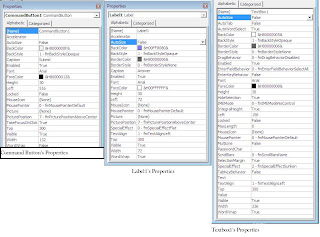
5. After you complete steps above, double click on commandbutton1. and a Visual basic will be opened
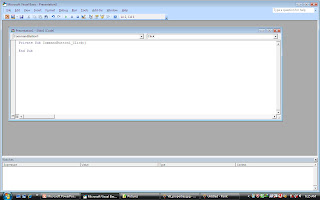
6. Now all you need is only to give them scripts, i only tell you the simple one :p
Private Sub CommandButton1_Click()
If (TextBox1.Text = 154) Then MsgBox "Great job, Correct!"
If (TextBox1.Text <> 154) Then MsgBox ("incorrect! Try again.")
TextBox1.Text = ""
End Sub

Now Play your Powerpoint and see the result. If you have any question, please comment or Chat with Us

Saturday, August 27, 2011

How to Play (read) Tab Guitar

Hello, I will tell you about How to Play (read) Tab Guitar. Actually I'm not good playing with guitar >.<
But somehow i always share as I can ;)
 
Introduction

First i will tell you what you must to know about "Parts" and what it was named.
E—————————————————————-
B—————————————————————-
G—————————————————————-
D—————————————————————-
A—————————————————————-
E—————————————————————-
 

Base Lessons

Ahh finally i made it, ok The E With Red line means: it is a First string on your guitar (count from bellow on your guitar). The B with the orange line means: That is The second string on your Guitar, And so on.
E—————————————————————-
B—————————————————————-
G—————————————————————-
D—————————————————————-
A—————————————————————-
E—4—3—2—1—0——————————————-

Now, there are numbers on the E string. It means when you found them you must pick your guitar according to the numbers. Example: When you found 4 on E string, you must pick your sixth string on the fourth fret.

Now, try to play the tab above!

E—3———————————————————-
B—3———————————————————-
G—4———————————————————-
D—5———————————————————-
A—5———————————————————-
E—3———————————————————-
When you found the parallel number on different strings, it mean that you must play it together as a chord.

Tab's Symbols

When you want to play guitar of course you will find these symbols. Now i will describe you what its mean.

h – hammer on
p – pull off
b – bend string up
r – release bend
/ – Slide up
\ – Slide down
v – vibrato
t – tap with right hand
x – play ‘note’ with heavy dumping

Actually i only describe Hammer on and Pull off. :D because they is most often show on Tab Guitar.

Hammer on

E—————————————————————-
B—————————————————————-
G—————————————————————-
D—————————————————————-
A——3h5——3h5——————————————-
E—0———0———0————————————- 

You see the tab above? it means you must play E on open, then play A on 3rd fret, then quickly press 5th fret. (but don't pick the sting) 

Pull off  

E—2p0—3p1—2p0—3p0———————————-
B—————————————————————-
G—————————————————————-
D—————————————————————-
A—————————————————————-
E—————————————————————-  

 Actually, Same as before. You need to play E on the 2nd string and then quickly release it (but don't pick the sting). Then Play E on 3rd string and then press E on the 1st string (but don't pick the sting).

Okey, I thing that is all that I know. Hope cane be useful :)

Translate to Indonesian

Friday, August 26, 2011

Learn Japanese Using Interactive Quiz

I have made this quiz to make you easy to gauge your ability in Japanese. Featured With True or false, Matching, and Blank Words questions.
and i have two version of language, There are :

and for password is rezax2

And before that, Make sure you have downloaded:
Latest Macromedia Flash Player

or for optional file, Japanese fonts are available here.
English Version Can Be Downloaded Here, or
Indonesian is Here

 Please leave Comment if there is (are) Bug.


Translate to Indonesian

Thursday, August 25, 2011

How to : Make Your Own Games

After reading this post, please don't said anymore that make the game is difficult. many roads lead to gaming, is now a lot of software that we can use to create similar games like Counter Strike (Shooting Game), Ragnarok (RPG) and Raiden (Arcade) without having to master the language programming. And the software are:

1. The 3D Gamemaker

This software can make 3D games with less than 5 hours, and can be directly playable or sold (For those who want to do business game), model making, gameplay, story can you do with this software. We only use the tools available to create 3D games. Now anyone can build their ideal game in seconds. With just one click of a mouse, you can create a uniquely playable game without needing any programming knowledge or artistic skills at all. Offering over 12 billion gaming options, The 3D Gamemaker opens up a whole new concept in gaming, providing fun for all the family.

Features

  • Instant and amazing results in seconds
  • Create a variety of exciting game scenarios with over 360 pre-made scenes
  • Over 500 3D objects
  • Over 320 Sounds
  • Save games as EXE files

Screenshoot


Ofiicial Site : www.thegamecreators.com


2. Unreal Development Kit

UDK is Unreal Engine 3 – a complete professional development framework. All the tools you need to create great games, advanced visualizations and detailed 3D simulations on the PC and iOS. The best tools in the industry are in your hands.

Unreal Engine 3 has been used by game developers, researchers, television studios, machinima directors, artists and students. If you have an idea that needs to be brought to life in a game engine, UDK is for you.

Features

  • Editing
  • Rendering
  • Animation
  • Scripting
  • Physics
  • Lighting
  • Cinematics
  • Terrain
  • Networking
  • Materials and Shaders
  • Audio
  • Particle Effects
  • Artificial Intelligence
  • Distributed Computing
  • Destructible Environments
  • Bink Video
  • SpeedTree
  • FaceFX
For Complete reviews Please Visit : http://udk.com/features

Screenshoot


Official Site : http://udk.com/

References 

http://udk.com/
http://udk.com/features
http://www.thegamecreators.com/
http://bahaskomputer.blogspot.com/2009/04/software-pembuat-game.html

And Special Thanks to : Google Translate

 Translate to Indonesian

Sunday, August 7, 2011

How to : Make Your Own Free Forum

Now I'll describe how to Make Your Own Free Forum. After you have Learned this tutorial, you will able to make your Own Forum and edit it content and design as what do you want.

1. Open http://www.forumotion.com/, And Click"Create a Free Forum"
2. You will redirected to this page. Now your task is only Select Your template and Click "Continue"
     Note : You can use another template by visiting Hitskin.com.

3. Now, fill all information box. You must fill all of them! Then Click "Continue"

4.  Now you will see this page. This page is tell you what the rules to make forum and ask you password again.

5. Click "Continue", Now You have been make your own forum. lets edit your forum by visit
    Http://your_forum_domain/admin
    Log in, and make your changes!


Translate to Indonesian

Friday, August 5, 2011

How to: Hacking Email, Facebook, and Blogger

Followings are some simple steps to HACK Email, Facebook, and Blogger. Before we begin, You must have download this one.

and let me start.

First, Download tool for hacking (listed above)

Second,
run Star Tools.exe and hit Tools, Then Select Keylogger


Next, you'll get keylogger  like this.


Then,  Fill all box with your email and password. This will send you a victim's username and password to your email

File server.exe is can be easily detected by antivirus.  Because of that, Go to Tools -> File Pumper.


Now, select the server.exe file you just created in step 4. Set the number of bytes you want to add using the File Pumper (you can set things like around 1 MB or even more) and press the "Pump Files". File Pumper will ask the name and path where you want to save files created by the pumped File Pumper. Select line and press Save. Let's say this file is named ser.exe.

Now, tie this ser.exe created in Step 6 with the others. Exe setup software or application that wants the victim vigorously. You can use the software for this Binder. Ask the victim to run the binded files on his computer. Once we run the file is sent, a keylogger can be installed on the computer and all his passwords and keystrokes typed are sent to the email address you entered in step 4. 

Thus, you have msn email password and can easily hack his account.
Hope this will help you to hack someones email password. If you have problems in using the software Tools hacking Star, mentioned in a comment.

Thursday, August 4, 2011

How to: Create One Click Shutdown Shortcut


First, create shortcut on your desktop by right clicking on the desktop, choosing new, and then choosing shortcut.
click the picture to enlarge
And then, The create shortcut wizard will appear. In the box asking for the location of the shortcut, type shutdown. Click Next and Finish.


click the picture to enlarge
Third,  double click on your shortcut, and change your icon.

click the picture to enlarge
Finish, those are our simple steps for Create One Click Shutdown Shortcut

But, not only that. You can do much more with the shortcut than merely shutdown your PC. You can add any combination of several switches to extra duty like this. Change them in the Target box

click the picture to enlarge

shutdown -s -t 03 -c "Bye Bye m8!"
shutdown -r -t 03 -c "Ill be back m8 ;)!"


Now I'll describe what do they mean
-s :  shutdown the PC.
-r :   restart the PC.
-l  :   log of current user.
-t <xx> = Indicates the duration of delay, in seconds, before performing the action. "xx" filled with  two number.
-c "message text" = display a message in the System Shutdown window. A maximum of 127 character.
-f = forces any running applications to shutdown.

Monday, July 25, 2011

Pes 2011 GP Cheats

This is my second post about cheating using cheat engine. Same as before all you need are
  • Installed PES 2011on your pc
  • Cheat engine, can be downloaded here
And let me begin

1. First, open your PES 2011
2. Go to Extra content menu and Write down your current GP, or remember it.

3. Press alt+tab, then run your cheat engine.

4. Click Open Process window, then search PES 2011 Process.

5. After That, input your current money to value text box. I Fill 9050

6. Do First Scan! Then a few address will be shown.

7. Go to PES 2011 Again. Buy some item(s) to decrease your GP.

8. Next,Remember or write down your decreased money.

9. get back to cheat engine. fill value text box with your decreased GP.

10. Click next scan. and only 4 address will be shown. double click all of them!

11. Then, Change all the address value with your desired value.

12. Back again to PES 2011, and view the result! did you rich? :D

Simple Right? All you need is only find memory and change it to your desired value.
still confused? allright if you have any question just fill comment box below

Sunday, July 17, 2011

PES 2010 ML Money Cheat using Cheat engine

I have some simple tips for you who have a trouble while managing your Master League (ML) . In this tutorial you will use Cheat engine, if you haven't have it you can download from cheat engine's official site, or search by Google


  • First, all you need is just run PES 2010 and load your Master league
  • Look at your ML Current money. Write it down and don't forget to set the currency as USD
  • Now Run your Cheat engine and then Click Open Process like picture below.

  • A window will come out. Find PES 2010 process!


  • Leave The Scan type and value type default and then input your ML money. IMPORTANT!! Don't input the last zero on your money. Ex. 785330510 Ex. your money is 785330510, input as 78533051 and Click First Scan

  • Then one or a few address will show on the list. double click on it! Note : if you found more than one address, win some money and input your new money in value text box, then do next scan

  • Then an address will copied on the address list. double click on value, and a box will come out. Fill the text box With your desired money. Ex. 99999999, Press OK!
 
  • Now Press Alt + Tab to see PES 2010 window. to see your new cheated money save it first and go back.
  • Woww you're rich now!
That  is all, Simple right? :) All you need is just follow my steps.
if you found trouble when cheating Just fill comment box bellow! ;)

hope this tutorial useful